Explainer · Updated October 2026
What Are Windows Widgets? The Widgets Board in 2026
Short answer: Windows widgets are small live cards that apps put on the Windows 11 Widgets Board, a panel that slides over your desktop when you press Win + W. Weather, calendar, CPU temperature, your analytics: glance and close. Since mid-2026 the board is quiet by default. It no longer opens when you hover over the taskbar, and it no longer badges for attention.
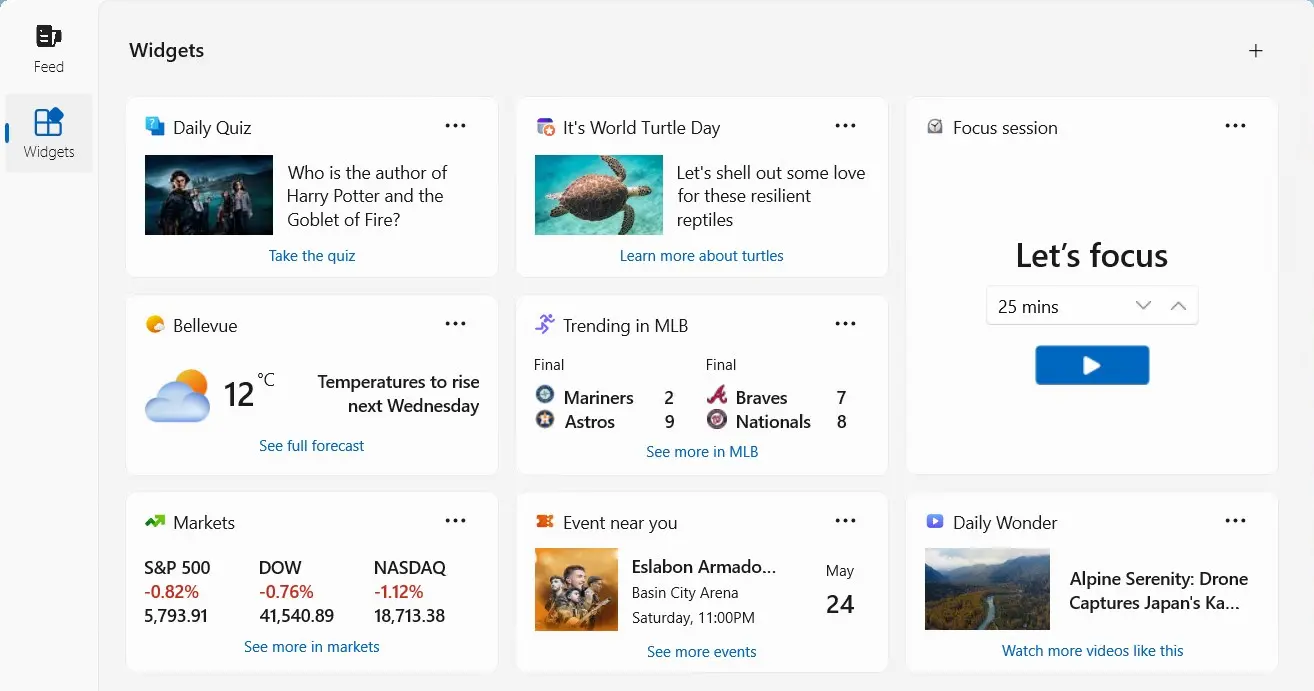
How widgets work
Where they live
On the Widgets Board (Win+W or the weather button on the taskbar), and widgets that support the small size can also go on the lock screen (Settings → Personalization → Lock screen).
Who makes them
Microsoft ships a few (Weather, Calendar, Photos, Watchlist). Everything else comes from apps you install: Phone Link, Spotify, Xbox, or Store apps built mainly to provide widgets, like system monitors and dashboards.
Why they're safe
Apps don't draw on the board. They send declarative card templates (Adaptive Cards) plus data, and Windows renders them with native controls. No scripts run on the board. That's a deliberate lesson from the Windows 7 gadgets, which were killed by a remote-code-execution attack (the full story). The service brokering it all is Widgets Platform Runtime.
What changed in 2026: "quiet by default"
The board's biggest complaint was that it got in the way: it popped open whenever the cursor brushed the taskbar, and it badged the taskbar to pull you into the news feed. Microsoft changed the defaults. Insiders got the change in May 2026, and it reached Windows 11 24H2 and 25H2 with the June 2026 optional update (KB5095093):
- Open on hover is off. The board opens only on click or Win+W.
- Taskbar badging is off, and alerts are limited until you actually open and use Widgets.
- The board opens to your widgets, not the feed. The news feed (Discover) has been optional since the 2024–2025 rebuild.
Want the old behaviour back? Open the board, click the gear icon, and turn on Open Widgets board on hover or taskbar badges. The hover option is also under Settings → Personalization → Taskbar → Taskbar behaviors.
Add, tame or turn off widgets
Add a widget
Press Win+W, click +, pick a widget and a size (small, medium or large where supported). Apps that ship widgets add their entries to this list when installed.
Hide the news feed
On the board, click the gear icon → Show or hide feeds → switch the feed off. Your pinned widgets stay.
Lock screen widgets
Settings → Personalization → Lock screen → Your widgets to add, remove or reorder small widgets shown before you sign in.
Turn widgets off
Settings → Personalization → Taskbar → Widgets off. That removes the button. Don't uninstall the underlying packages: Windows reinstalls them.
What's actually worth pinning
With the feed out of the way, the board is only as useful as what you pin to it. The best widgets answer a question you'd otherwise open an app or a browser tab for:
- "Is my PC throttling or just slow?" Windows has no built-in CPU or GPU widget since Dev Home was retired in May 2025. Witals puts CPU temperature, GPU, RAM and network back on the board.
- "How much of my Claude Code limit is left?" Wburn shows live Claude Code, Codex and Gemini CLI usage.
- "Did the launch land?" Wizible shows your Plausible Analytics visitors and goals.
For developers
A widget is a Windows app that implements a widget provider with the Windows App SDK, or a PWA that declares widgets in its web app manifest. Quiet-by-default makes the board a place users visit on purpose, which suits glanceable product data better than the old feed-first board. Start with how to create a Windows 11 widget in C#, or have one built for your product.
Frequently asked questions
What are Windows widgets?
Small, live-updating cards that apps provide to the Windows 11 Widgets Board (Win+W), and in some cases the lock screen. They show information at a glance without opening the app.
Why don't widgets open on hover anymore?
Microsoft made Widgets quiet by default in 2026 (June optional update KB5095093 for 24H2 and 25H2). Turn hover back on from the gear icon on the board or in Settings → Personalization → Taskbar.
How do I turn off widgets?
Settings → Personalization → Taskbar → Widgets off. To keep widgets but lose the news, turn the feed off under the board's gear icon → Show or hide feeds.
Can I add my own widgets?
Yes. Click + on the board for widgets from installed apps, install more from the Microsoft Store, or build your own with the Windows App SDK.
Do widgets work on Windows 10?
No. The Widgets Board is Windows 11 only. Windows 10 has the older News and interests panel, which doesn't take third-party widgets.
Related: What is Widgets Platform Runtime? · History of Windows widgets · Add CPU, GPU & RAM widgets
Put something useful on your Widgets Board
Free native widgets from the Microsoft Store, built on the platform described above.
Building a SaaS? Get a widget for your product →