Free System Monitor Widgets for Windows 11
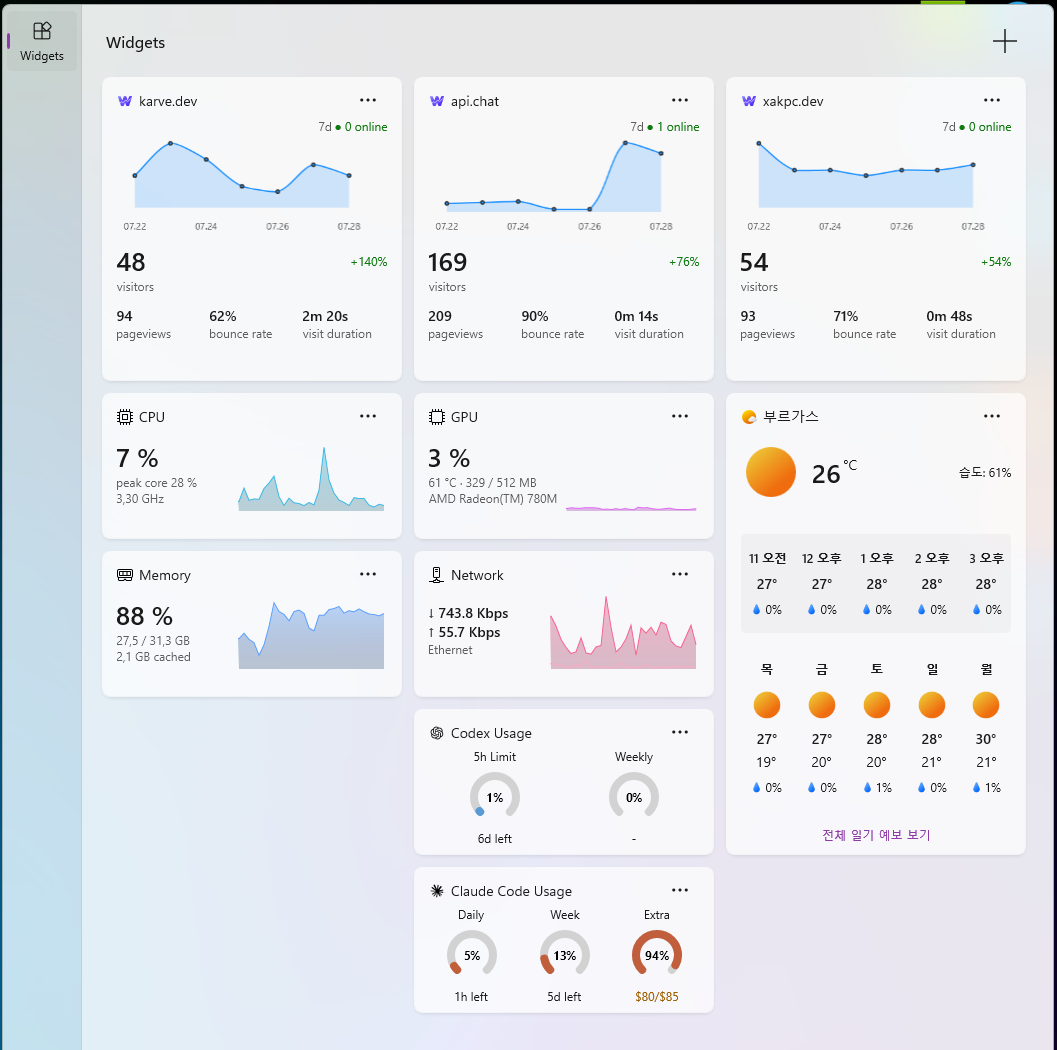
Is it throttling, or is it just slow? Task Manager shows utilization but not the CPU temperature that explains it — and only for as long as you keep it open. Witals keeps temperature and peak core, GPU, memory and network on the Windows 11 Widgets Board, one Win+W away: one big number, one live supporting reading, and a sparkline of the last minute. No extra window, no account.

Windows 11 required · nothing to install alongside it
Two Sizes
Small — built for a glance
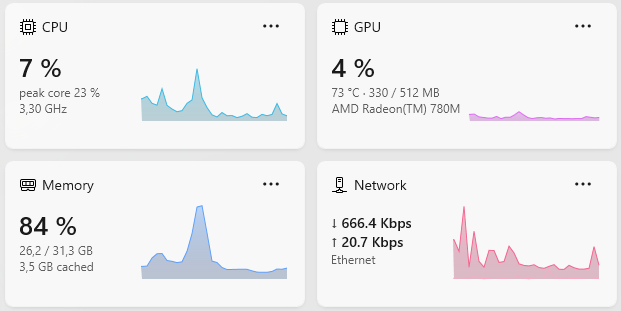
Three lines and a chart: one big primary number, one live supporting reading beside it, and a dim third line that says what the hardware is rather than measuring it — the adapter, the connection, the rated clock. Beside them, a sparkline of the last minute.
Medium — the labelled detail
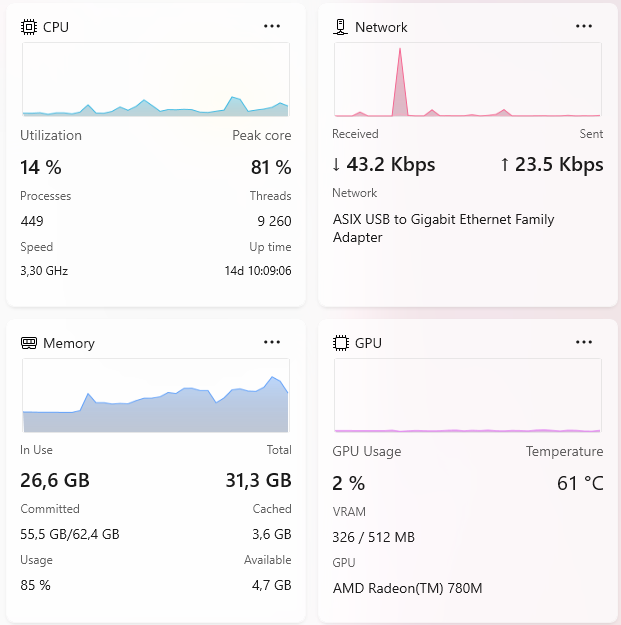
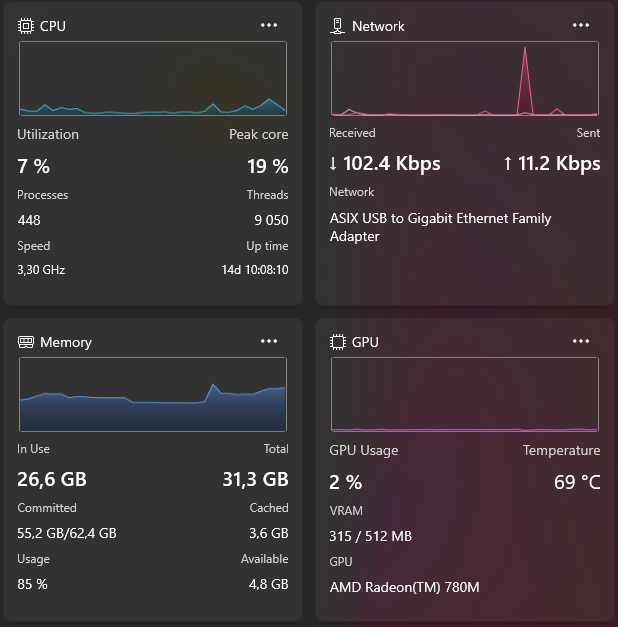
Chart across the top, then labelled value rows: CPU adds process count, rated speed and uptime; Memory adds committed, cached and available; GPU adds VRAM and the adapter name. And it follows your Windows theme, light or dark, without a setting.
Light
Dark
CPU
Utilization and temperature, plus the load on the busiest single core — the number overall usage hides.
GPU
Utilization, temperature and dedicated VRAM, with the adapter named on the card. Utilization alone is uninformative, so it never appears alone.
Memory
In use against total — because "23.6 GB" says nothing until you know the machine has 31.3 GB. Medium adds committed, cached and available.
Network
Download and upload with equal billing on a two-series chart, named the way you name the connection — "Wi-Fi", "Ethernet" — not by its hardware string.
Why It's Different
CPU temperature, no driver
The hottest thermal zone your firmware reports — the one route to it that needs no kernel driver, no elevation prompt, and no reboot.
The number overall usage hides
A single saturated thread reads about 10% on a 16-thread machine — indistinguishable from idle — against a 57% peak core. Witals shows both.
It keeps watching while you're not
Sampling continues whether or not the board is open, so it opens onto live readings and an unbroken chart instead of a blank one filling in.
Charts that fit their data
Memory and network scale to their own range. On a fixed 0–100 axis memory is a solid block and network is a flat line at zero; neither tells you anything.
Nothing leaves your machine
No account, no sign-in, no telemetry, no network calls of any kind. Witals reads your hardware and draws it.
Native, and self-contained
Built on the Windows App SDK — no Electron, no bundled browser, no window to keep open. There is no runtime to install alongside it.
Honest about where its numbers come from
CPU temperature tracks the die closely, but a PC that declares no thermal zone simply shows none — and GPU temperature and VRAM come from a library that isn't guaranteed to work on every adapter. A missing reading is dropped, never faked as --. The speed on the CPU card is the chip's rated frequency rather than its live clock, and it's labelled and placed as the fixed number it is.
How It Works
Install from Store
Get Witals from the Microsoft Store. It's completely free.
Pin a Widget
Press Win+W, choose + Add widgets, then pick CPU, GPU, Memory, or Network.
Resize to Taste
Small for a glance, medium for the labelled detail. That's it!
Guides
FAQ
Does Windows 11 have built-in CPU and GPU widgets?
Not anymore — the official ones shipped with Dev Home, which Microsoft deprecated in May 2025. Witals puts the same four widget types back on the board.
Learn more →How do I add the widgets to Windows 11?
Install Witals, press Win+W, choose + Add widgets, and pin CPU, GPU, Memory, or Network. Each one comes in small and medium.
Learn more →Does Witals show CPU temperature?
Yes, on both sizes. It reads the hottest thermal zone your firmware reports — no kernel driver, no elevation prompt, no reboot. A PC that declares no thermal zone simply shows no temperature rather than a made-up one.
Is Witals really free?
Yes — completely free on the Microsoft Store. No account, no ads, no in-app purchases.
Does it work on Windows 10?
No — the Widgets Board itself is a Windows 11 feature, so Witals requires Windows 11 21H2 (build 22000) or later.
Do the widgets slow down my PC?
No meaningful impact. Sampling all four sources costs roughly 4 ms, and the heavier work of drawing a card only happens while that widget is actually on screen.
Does Witals send any data anywhere?
No. There is no account, no sign-in, no telemetry, and no network calls of any kind. Witals reads your hardware and draws it.
Can it replace Task Manager?
For glanceable monitoring, yes — the CPU widget even surfaces peak core load, which overall utilization hides. For killing processes or per-core graphs, you'll still open Task Manager occasionally.
Requirements
Windows 11 21H2 or later
Build 22000+. The Widgets Board does not exist on Windows 10.
x64 or ARM64
Both architectures ship in the same Store package.
No runtime to install
The package is self-contained — there is no prerequisite to download first.
Need a custom widget for your product?
Custom Windows widgets, built for your brand.
Ready to monitor your system at a glance?
Always free. No account required.

I post what I'm building — new widgets, Windows dev notes, and the occasional thing that didn't work.
Follow on X