Explainer · Updated October 2026
Windows 11 Has Two Widgets Boards. Here's How to Get the Lighter One.
Press Win + W on two PCs with the same Windows build and you can get two different boards. One is a lean native WinUI panel. The other is a web page in Edge WebView2 that runs nine processes, uses about 2.5 times the memory, and leads with an MSN feed.
Short answer: one Windows feature flag, 50179255, decides which board you get. Microsoft is turning it on gradually. Turn it on yourself with ViVeTool, restart, and you get the native board:
ViVeTool /enable /id:50179255Tested on Windows 11 25H2 (build 26200.9457), Windows Web Experience Pack 526.21100.40.0 and Start Experiences app 1.336.0.0, October 2026. This changes an unofficial feature flag: it's easy to undo, but Microsoft doesn't support it.
The two boards, side by side
Both boards come in the same Store package, the Windows Web Experience Pack (MicrosoftWindows.Client.WebExperience). Same widgets, same machine, a few minutes apart:
Native
~51 MB
2 processes
Web
~134 MB
9 processes
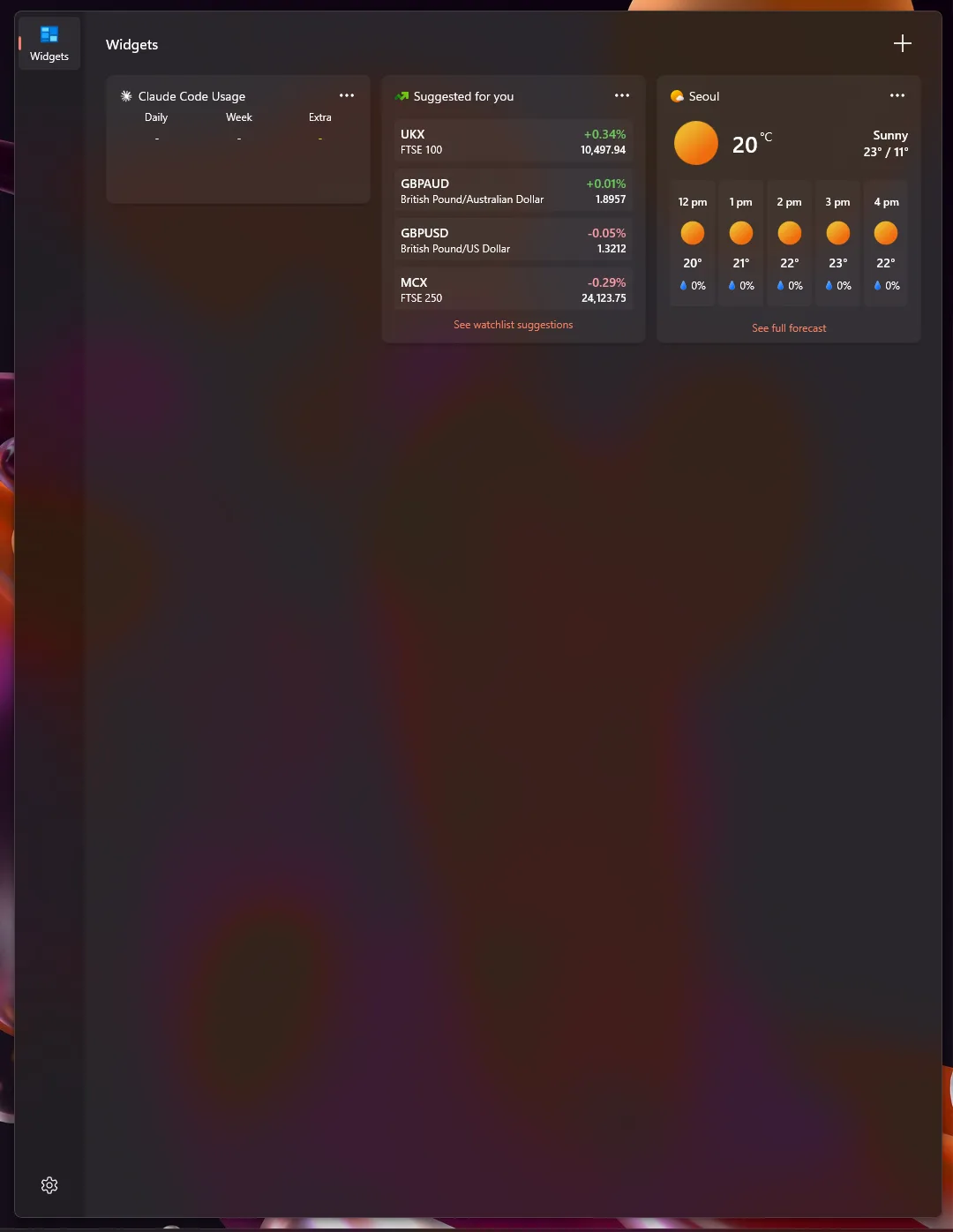
WidgetBoard.exe, WinUI 3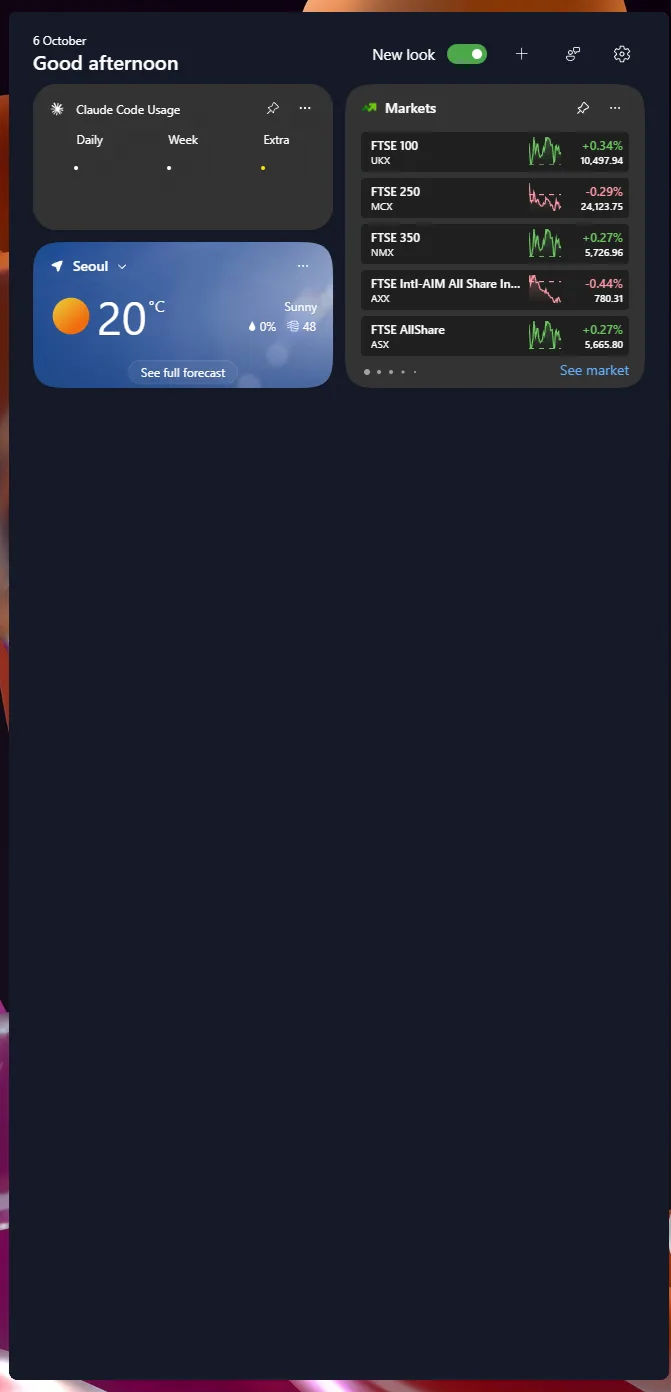
Widgets.exe, Edge WebView2| Native board | Web board | |
|---|---|---|
| Program | WidgetBoard.exe (WinUI 3) | Dashboard\Widgets.exe (Edge WebView2) |
| Content from | The Start Experiences app (MicrosoftStartFeedProvider.exe) | Its own built-in MSN web feed |
| Processes | 2: WidgetBoard.exe and WidgetService.exe | 9: Widgets.exe, 6 WebView2 processes, Crashpad, Runtime Broker |
| Memory (screenshots below) | about 51 MB | about 134 MB |
Task Manager, native board first:
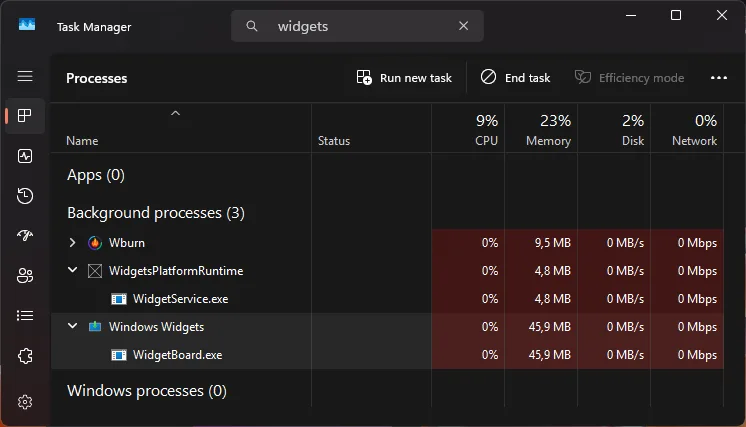
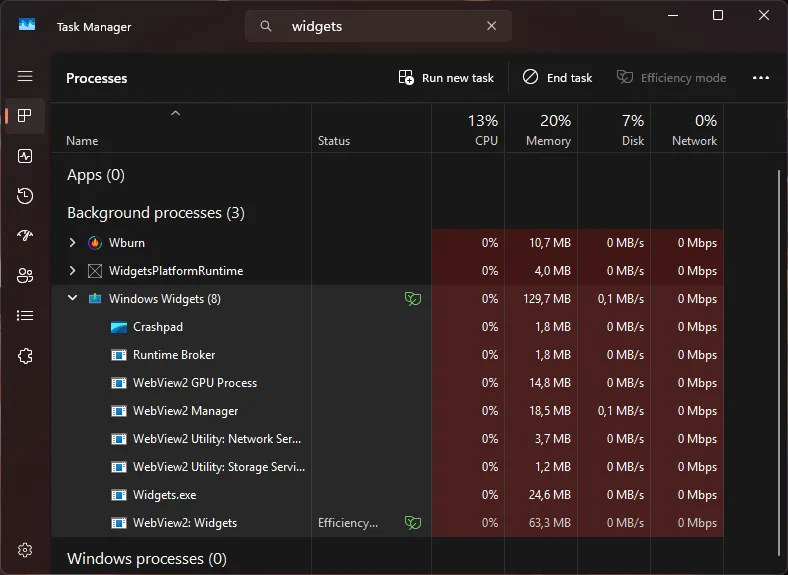
The WidgetService.exe on the native side belongs to Widgets Platform Runtime, the service that every widget app talks to. Updating or reinstalling the Web Experience Pack doesn't change which board you get. Only the flag does.
Which board do I have?
Press Win + W to open Widgets, then run this in PowerShell:
Get-Process WidgetBoard, Widgets -ErrorAction SilentlyContinue | Select-Object Name, PathWidgetBoard: you already have the native board. Nothing to do.Widgets(path ending in\Dashboard\Widgets.exe): you have the web board. Read on.
The visual tell: the web board has a "Good afternoon" greeting with the date above it. The native board has a narrow rail on the left with a gear icon at the bottom.
Switch to the native board
Option A: the script
Enable-NativeWidgetBoard.ps1 checks the prerequisites, gets ViVeTool, flips the flag and confirms it took.
Copy the full source below and save it as Enable-NativeWidgetBoard.ps1.
- Open PowerShell (no admin needed) in the folder with the script, then unblock and run it:
PowerShell
Get-ChildItem *.ps1 | Unblock-File powershell -ExecutionPolicy Bypass -File .\Enable-NativeWidgetBoard.ps1 - Click Yes on the UAC prompt. Only the flag change runs as administrator.
- Restart the PC. The script offers to do it for you.
- Press Win + W. You should see the native board.
.\Enable-NativeWidgetBoard.ps1 -Statusconfirms it.
What the script does:
- installs the Web Experience Pack from the Microsoft Store if it's missing (common after a debloater has run);
- warns you if the Start Experiences app is missing;
- uses ViVeTool if it finds it, and otherwise downloads the official ViVeTool v0.3.4 release from GitHub and checks it against a pinned SHA-256 hash;
- enables flag
50179255, then confirms the change took effect.
Read the full source: Enable-NativeWidgetBoard.ps1
#Requires -Version 5.1
<#
.SYNOPSIS
    Switches the Windows 11 Widgets board from the WebView version (Widgets.exe)
    to the native WinUI version (WidgetBoard.exe), or back.

.DESCRIPTION
    The Windows Web Experience Pack ships two Widgets boards. Which one the shell
    starts is decided by the Windows feature flag 50179255 (internal name
    "LockWidgetCanvas"). Microsoft enables it through a staged rollout, so two PCs
    on the same build and package versions can get different boards.

    This script:
      1. Checks the Web Experience Pack and Start Experiences app are installed
         (and installs the pack from the Microsoft Store if it is missing).
      2. Finds ViVeTool, or downloads the pinned official release and verifies
         its SHA-256 hash.
      3. Enables (or with -Undo, resets) feature 50179255. Only this step needs
         administrator rights; a UAC prompt appears.
      4. Asks you to restart. A full restart is required; restarting Explorer
         is not enough.

    After the restart the native board migrates your old board settings
    (including a disabled news feed) by itself.

.PARAMETER Status
    Only report the current state. Changes nothing and needs no admin rights.

.PARAMETER Undo
    Reset the feature flag to the Windows default (back to the web board after
    a restart).

.PARAMETER ViVeToolPath
    Path to an existing ViVeTool.exe. If omitted, the script looks in PATH, next
    to this script, and in %LOCALAPPDATA%\ViVeTool, then downloads it.

.PARAMETER Restart
    Restart the computer at the end without asking.

.EXAMPLE
    .\Enable-NativeWidgetBoard.ps1 -Status

.EXAMPLE
    .\Enable-NativeWidgetBoard.ps1

.EXAMPLE
    .\Enable-NativeWidgetBoard.ps1 -Undo
#>
[CmdletBinding(DefaultParameterSetName = 'Enable')]
param(
    [Parameter(ParameterSetName = 'Status')]
    [switch]$Status,

    [Parameter(ParameterSetName = 'Undo')]
    [switch]$Undo,

    [Parameter(ParameterSetName = 'Enable')]
    [Parameter(ParameterSetName = 'Undo')]
    [string]$ViVeToolPath,

    [Parameter(ParameterSetName = 'Enable')]
    [Parameter(ParameterSetName = 'Undo')]
    [switch]$Restart
)

$ErrorActionPreference = 'Stop'

$FeatureId       = 50179255
$WebExperience   = 'MicrosoftWindows.Client.WebExperience'
$StartExperience = 'Microsoft.StartExperiencesApp'
$StoreId         = '9MSSGKG348SP'   # Windows Web Experience Pack

$ViVeVersion = 'v0.3.4'
$ViVeBuilds  = @{
    AMD64 = @{ Asset = 'ViVeTool-v0.3.4-IntelAmd.zip';        Sha256 = 'CC27F073F3FE5DD2C3D947FAF558FD4B2F8E34454F812689B0D65EE8A52E4147' }
    ARM64 = @{ Asset = 'ViVeTool-v0.3.4-SnapdragonArm64.zip'; Sha256 = '30AD9A4912686355BFCE60E1D7BEF608735475B7E2160D67418EED8F5E3BA8C7' }
}

function Write-Step([string]$Text) { Write-Host "==> $Text" -ForegroundColor Cyan }

function Get-RunningBoard {
    $names = @(Get-Process -Name WidgetBoard, Widgets -ErrorAction SilentlyContinue | ForEach-Object Name)
    if ($names -contains 'WidgetBoard') { 'Native (WidgetBoard.exe)' }
    elseif ($names -contains 'Widgets') { 'Web (Widgets.exe)' }
    else { 'Not running (press Win+W, then check again)' }
}

function Get-FeatureState([string]$ViVe) {
    if (-not $ViVe) { return 'Unknown (ViVeTool not found)' }
    $out = & $ViVe /query "/id:$FeatureId" 2>&1 | Out-String
    if ($out -match 'State\s*:\s*(\w+)') {
        $state = $Matches[1]
        if ($out -match 'Priority\s*:\s*(\w+)') { "$state (priority: $($Matches[1]))" } else { $state }
    }
    else { 'Not configured (Windows default)' }
}

function Find-ViVeTool([string]$Hint) {
    if ($Hint) {
        if (Test-Path $Hint) { return (Resolve-Path $Hint).Path }
        throw "ViVeTool not found at '$Hint'."
    }
    $cmd = Get-Command ViVeTool.exe -ErrorAction SilentlyContinue
    if ($cmd) { return $cmd.Source }
    foreach ($p in (Join-Path $PSScriptRoot 'ViVeTool\ViVeTool.exe'),
                   (Join-Path $env:LOCALAPPDATA 'ViVeTool\ViVeTool.exe')) {
        if (Test-Path $p) { return $p }
    }
    return $null
}

function Install-ViVeTool {
    $arch = if ($env:PROCESSOR_ARCHITECTURE -eq 'ARM64') { 'ARM64' } else { 'AMD64' }
    $build = $ViVeBuilds[$arch]
    $url = "https://github.com/thebookisclosed/ViVe/releases/download/$ViVeVersion/$($build.Asset)"
    $dest = Join-Path $env:LOCALAPPDATA 'ViVeTool'
    $zip = Join-Path $env:TEMP $build.Asset

    Write-Step "Downloading ViVeTool $ViVeVersion ($arch) from GitHub"
    [Net.ServicePointManager]::SecurityProtocol = [Net.SecurityProtocolType]::Tls12
    Invoke-WebRequest $url -OutFile $zip -UseBasicParsing

    $hash = (Get-FileHash $zip -Algorithm SHA256).Hash
    if ($hash -ne $build.Sha256) {
        Remove-Item $zip -Force
        throw "ViVeTool download hash mismatch (got $hash). Not using it."
    }
    New-Item -ItemType Directory -Force $dest | Out-Null
    Expand-Archive $zip $dest -Force
    Remove-Item $zip -Force
    Join-Path $dest 'ViVeTool.exe'
}

function Show-Status([string]$ViVe) {
    $web = Get-AppxPackage -Name $WebExperience
    $start = Get-AppxPackage -Name $StartExperience
    $os = Get-ItemProperty 'HKLM:\SOFTWARE\Microsoft\Windows NT\CurrentVersion'
    [pscustomobject]@{
        'Windows'                  = "$($os.DisplayVersion) build $($os.CurrentBuild).$($os.UBR)"
        'Web Experience Pack'      = if ($web) { $web.Version } else { 'MISSING' }
        'Start Experiences app'    = if ($start) { $start.Version } else { 'MISSING' }
        "Feature $FeatureId"       = Get-FeatureState $ViVe
        'Board running'            = Get-RunningBoard
    } | Format-List
}

# --- Status only -----------------------------------------------------------
if ($Status) {
    Show-Status (Find-ViVeTool $null)
    return
}

# --- Prerequisites ---------------------------------------------------------
if (-not $Undo) {
    if (-not (Get-AppxPackage -Name $WebExperience)) {
        Write-Step 'Windows Web Experience Pack is missing; installing it from the Microsoft Store'
        if (-not (Get-Command winget -ErrorAction SilentlyContinue)) {
            throw "winget not found. Install 'Windows Web Experience Pack' ($StoreId) from the Microsoft Store, then run this script again."
        }
        winget install --id $StoreId --source msstore --accept-package-agreements --accept-source-agreements
        if (-not (Get-AppxPackage -Name $WebExperience)) { throw 'Web Experience Pack installation failed.' }
    }
    if (-not (Get-AppxPackage -Name $StartExperience)) {
        Write-Warning ("The Start Experiences app ($StartExperience) is missing. The native board gets its " +
            'widgets and feed from it. Windows normally restores it from C:\Windows\InboxApps; if widgets ' +
            'stay empty, reinstall it from the Microsoft Store.')
    }
}

$vive = Find-ViVeTool $ViVeToolPath
if (-not $vive) { $vive = Install-ViVeTool }
Write-Step "Using ViVeTool: $vive"

# --- Change the flag (elevated) --------------------------------------------
$action = if ($Undo) { 'reset' } else { 'enable' }
Write-Step "Running 'ViVeTool /$action /id:$FeatureId' as administrator (accept the UAC prompt)"
$proc = Start-Process -FilePath $vive -ArgumentList "/$action", "/id:$FeatureId" -Verb RunAs -Wait -PassThru -WindowStyle Hidden
if ($proc.ExitCode -ne 0) { throw "ViVeTool exited with code $($proc.ExitCode)." }

$state = Get-FeatureState $vive
Write-Step "Feature $FeatureId is now: $state"
if (-not $Undo -and $state -notmatch '^Enabled') { throw 'The feature was not enabled. Check that the UAC prompt was accepted.' }

# --- Restart ---------------------------------------------------------------
$target = if ($Undo) { 'web board (Widgets.exe)' } else { 'native board (WidgetBoard.exe)' }
Write-Host ''
Write-Host "Done. A full restart is required for the $target to take over." -ForegroundColor Green
Write-Host "Afterwards, press Win+W and run: .\Enable-NativeWidgetBoard.ps1 -Status"

if ($Restart) {
    Restart-Computer
}
else {
    $answer = Read-Host 'Restart now? [y/N]'
    if ($answer -match '^(y|yes)$') { Restart-Computer }
}
Option B: by hand
- If the Widgets button does nothing, reinstall the Web Experience Pack:
winget install 9MSSGKG348SP --source msstore - Download ViVeTool and extract it.
- In an admin terminal, in that folder:
.\ViVeTool.exe /enable /id:50179255 - Restart the PC.
After the restart
The native board moves your old settings over by itself, including a news feed you'd already turned off. To turn the feed off or back on, open the board, click the gear icon, then Show or hide feeds. With the feed off, the board is only your widgets.
Undo
.\Enable-NativeWidgetBoard.ps1 -Undo
# or, in an admin terminal:
ViVeTool /reset /id:50179255
Restart, and the web board comes back.
Things to know
A full restart is required. Restarting Explorer or signing out wasn't enough in testing.
A big Windows update can reset the flag. If the web board comes back, run the script again.
The flag's name is misleading. Its internal name is LockWidgetCanvas, which sounds like lock-screen widgets. But it's checked in twinui.pcshell.dll and SettingsHandlers_DesktopTaskbar.dll, the two Windows files that choose between the boards.
Using a debloater? Exclude MicrosoftWindows.Client.WebExperience and Microsoft.StartExperiencesApp. The native board gets its widgets and feed from the Start Experiences app.
Editing the registry doesn't switch the board. The native board's settings, such as SelectedBoard and MigrationStates, are a result of the switch, not its cause. With the flag off, Windows starts the web board even when those values exist.
Deep dive
How I found the flag
Two of my PCs had the same Windows build and the same package versions. One had the native board, the other the web board. This is how I tracked down the difference.
-
01
The package manifest
AppxManifest.xmlin the Web Experience Pack registers two separate boards:Microsoft.Windows.DashboardServer(Dashboard\Widgets.exe) andMicrosoft.Windows.WidgetBoardServer(WidgetBoard.exe). The native board's fallback feed is described as being for when "the Start Experiences App is not available". That tied the native board to the Start Experiences app. -
02
Strings in the board binaries
WidgetBoardView.dllcontains a migration system (DashboardMigration,migrateDashboardFeedDisablementand others) and the registry path...\CurrentVersion\Dsh\WidgetBoard\MigrationStates. So the native board is built to take over from the web board. -
03
A hidden registry
Those keys don't show up in a normal
reg query. They live in the package's private registry, and the only way to read them is to runreg.exeinside the package:PowerShellInvoke-CommandInDesktopPackage -PackageFamilyName MicrosoftWindows.Client.WebExperience_cw5n1h2txyewy ` -AppId Global.WidgetBoard -Command C:\Windows\System32\reg.exe ` -Args 'export HKCU\Software\Microsoft\Windows\CurrentVersion\Dsh C:\Temp\dsh.reg /y' -PreventBreakawayThe native-board PC had
SelectedBoard = ...!WidgetBoard!!WidgetBoardanddashboardSettingsMigrated = 1. The web-board PC had neither. -
04
Copying the registry value didn't help
Setting
SelectedBoardon the web-board PC changed nothing. A search across the binaries showed that onlyWidgetBoardView.dllreads that value. It records the choice; it doesn't make it. -
05
Finding who decides
Searching the Windows shell files for the two board registration names (
com.microsoft.windows.extension.dashboardand...extension.widgetboard) pointed totwinui.pcshell.dll. It reads no "which board" setting from the registry, which pointed to a feature flag. -
06
Comparing feature flags
I exported the flag overrides from both PCs with
Export-WidgetDiagnostics.ps1(source below). The registry stores an obfuscated form of each feature ID, so I converted them back with ViVeTool's own formula. 46 flags differed. -
07
Narrowing to a handful of suspects
Windows code checks a flag by its numeric ID, which sits in the binary as 4 bytes. Searching the shell and widget binaries for the 30 candidate IDs left 4 that appeared in the right files. One of those was already on by Windows default, so it was out.
-
08
Testing, both ways
All 30 flags on, restart: native board. Only
50179255on, with theDshkeys cleared first: native board, and it migrated by itself.50179255off again, even with the migration keys present: the web board came back. On again: native again. One flag, confirmed both ways.
Why some PCs already have it: on the native-board PC, the MSN feed's test-group list included 1s-wid-automig-t, which reads like "widgets auto-migration, treatment group". That fits Microsoft moving PCs over gradually as an experiment.
Compare two PCs yourself: Export-WidgetDiagnostics.ps1
Writes build-, features- and widgets-<PC> reports to the Desktop, including the package-private Dsh settings. No admin needed. Run it on both PCs and diff the files.
#Requires -Version 5.1
<#
.SYNOPSIS
    Collects everything needed to compare the Widgets setup of two PCs.

.DESCRIPTION
    Writes three files to the Desktop, named after the computer:
      build-<PC>.txt     Windows version and build.
      features-<PC>.csv  Feature-flag overrides from the registry
                         (HKLM\...\FeatureManagement\Overrides).
      widgets-<PC>.txt   Widget package versions, running widget processes, and
                         the widget board settings (Dsh key) - both the normal
                         registry and the package-private registry, which a
                         plain "reg query" cannot see.

    Run it on both PCs and compare the files. Needs no admin rights.

    Note: the IDs in features-<PC>.csv are the registry key names, which are an
    obfuscated form of the real feature IDs. Use ViVeTool /query to see real IDs.
#>
$ErrorActionPreference = 'Continue'
$desktop = [Environment]::GetFolderPath('Desktop')
$name = $env:COMPUTERNAME

$v = Get-ItemProperty 'HKLM:\SOFTWARE\Microsoft\Windows NT\CurrentVersion'
"$($v.DisplayVersion) build $($v.CurrentBuild).$($v.UBR) $($v.EditionID)" |
    Out-File "$desktop\build-$name.txt"

$root = 'HKLM:\SYSTEM\CurrentControlSet\Control\FeatureManagement\Overrides'
Get-ChildItem $root -Recurse -ErrorAction SilentlyContinue |
    Where-Object { $_.Property -contains 'EnabledState' } |
    ForEach-Object {
        $p = Get-ItemProperty $_.PSPath
        [pscustomobject]@{
            Id       = $_.PSChildName
            Priority = $_.PSParentPath.Split('\')[-1]
            State    = $p.EnabledState
            Variant  = $p.Variant
        }
    } |
    Sort-Object Id |
    Export-Csv "$desktop\features-$name.csv" -NoTypeInformation

$widgets = "$desktop\widgets-$name.txt"
'MicrosoftWindows.Client.WebExperience', 'Microsoft.StartExperiencesApp', 'Microsoft.WidgetsPlatformRuntime' |
    ForEach-Object { Get-AppxPackage -Name $_ } |
    Select-Object Name, Version | Out-File $widgets
Get-CimInstance Win32_Process -Filter "Name like 'Widget%' or Name='MicrosoftStartFeedProvider.exe'" |
    Select-Object Name, CommandLine | Format-List | Out-File $widgets -Append

foreach ($key in 'HKCU\SOFTWARE\Microsoft\Windows\CurrentVersion\Dsh',
                 'HKLM\SOFTWARE\Microsoft\Windows\CurrentVersion\Dsh',
                 'HKLM\SOFTWARE\Policies\Microsoft\Dsh') {
    "===== $key" | Out-File $widgets -Append
    reg query $key /s 2>$null | Out-File $widgets -Append
}

# The native board stores its settings in the package's private registry hive.
# Running reg.exe inside the package context is the only way to read them.
$pkgExport = Join-Path $env:TEMP "dsh-package-$name.reg"
try {
    Invoke-CommandInDesktopPackage -PackageFamilyName 'MicrosoftWindows.Client.WebExperience_cw5n1h2txyewy' `
        -AppId 'Global.WidgetBoard' -Command 'C:\Windows\System32\reg.exe' `
        -Args "export HKCU\Software\Microsoft\Windows\CurrentVersion\Dsh `"$pkgExport`" /y" -PreventBreakaway
    Start-Sleep -Seconds 4
    "===== Package-private HKCU\...\Dsh (SelectedBoard / MigrationStates)" | Out-File $widgets -Append
    if (Test-Path $pkgExport) {
        Get-Content $pkgExport -Encoding Unicode |
            Where-Object { $_ -match '^\[.*(\\Dsh|MigrationStates)\]$|SelectedBoard|Migrated|disabledFeeds' } |
            Out-File $widgets -Append
        Remove-Item $pkgExport -Force
    }
    else { 'Could not read (is the Web Experience Pack installed?)' | Out-File $widgets -Append }
}
catch { "Could not read package registry: $_" | Out-File $widgets -Append }

"Saved build-$name.txt, features-$name.csv and widgets-$name.txt to $desktop"
Frequently asked questions
Why does my Widgets board look different from another PC's?
Windows 11 ships two boards in the same Web Experience Pack: native WidgetBoard.exe and WebView2 Dashboard\Widgets.exe. Flag 50179255 decides which one starts, and Microsoft is turning it on gradually, so two PCs on the same build can differ.
Is enabling feature 50179255 with ViVeTool safe?
It changes one flag that Microsoft is already rolling out, and ViVeTool /reset /id:50179255 plus a restart undoes it. It's unofficial and unsupported, and a major Windows update can reset it.
Can I turn off the news feed on the native board?
Yes: gear icon, then Show or hide feeds. If you'd already turned the feed off on the web board, the native board carries that over by itself.
Why does Widgets.exe use so much memory?
It's the WebView2 board: it renders the board as a web page, alongside six Edge WebView2 processes, Crashpad and a Runtime Broker. In testing that was about 134 MB across 9 processes, against about 51 MB across 2 for the native board.
How do I go back to the old board?
Run ViVeTool /reset /id:50179255 as administrator, or Enable-NativeWidgetBoard.ps1 -Undo, then restart.
Will a Windows update undo the switch?
A major update can reset feature-flag overrides. If the web board comes back, enable the flag again and restart.
Related: What are Windows widgets? · What is Widgets Platform Runtime? · History of Windows widgets
Credits: ViVeTool by thebookisclosed, for querying and changing feature flags. mach2 by Rafael Rivera, for the public feature-name list (LockWidgetCanvas).
Put something useful on your Widgets Board
Free native widgets from the Microsoft Store, built on the platform described above.
Building a SaaS? Get a widget for your product →