Track Your Claude Code, Codex & Gemini CLI Usage Limits
How fast are you burning? Live usage gauges for Claude Code, OpenAI Codex, and Gemini CLI — right in your Windows Widgets Board. Know your 5-hour window and weekly limits before they cut you off.

Windows 11 required
Supported Agents

Claude Code
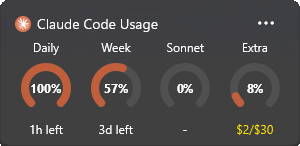
Tracked Limits
- Daily (5-hour window)
- Weekly
- Sonnet model
- Extra usage spend

OpenAI Codex
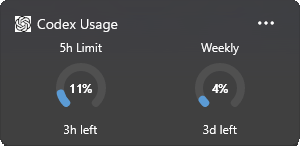
Tracked Limits
- 5-hour primary window
- Weekly secondary window

Gemini CLI
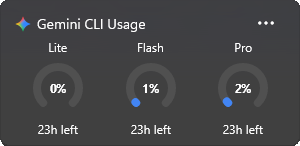
Tracked Limits
- Flash Lite quota
- Flash quota
- Pro quota
Features
Zero Config
Reads existing CLI tokens. If you've logged in, Wburn just works.
Auto-Refresh
Usage data updates every 5 minutes. Always current.
Privacy-First
No telemetry, no credential storage. Tokens read in-memory only.
Clear Error States
Tells you exactly when a CLI isn't installed or a token has expired.
Dark & Light Themes
Adapts to your Windows theme preference automatically.
Offline Caching
Shows last-known data when your connection drops.
How It Works
Install from Store
Get Wburn from the Microsoft Store.
Open Widgets Board
Press Win+W or swipe from the left edge.
Already Tracking
If you've used a CLI before, Wburn reads your existing tokens and starts showing data immediately.
Guides
How to Check Your Claude Code Usage Limits
The 5-hour window, weekly caps, and three ways to see them — including one that doesn't interrupt your session.
ccusage vs Wburn: Which Usage Tracker Do You Need?
Terminal cost reports vs live limit gauges — an honest comparison (spoiler: many devs run both).
How to Check Your Codex Usage Limits
/status, the usage dashboard, and a live gauge, plus why some days the allowance runs out faster.
FAQ
How do I check my Claude Code usage limits?
Type /usage in a session — or pin Wburn's widget and see the 5-hour window, weekly, and model limits without interrupting your work.
Learn more →Is Wburn an alternative to ccusage?
For live limit monitoring, yes. For retrospective token cost reports, ccusage still shines — they complement each other.
Learn more →Does Wburn store my credentials?
No. It reads your existing CLI tokens in-memory only and talks exclusively to each provider's own usage endpoint. No telemetry, no storage.
Which agents are supported?
Claude Code, OpenAI Codex, and Google Gemini CLI — each with its own widget tracking the limits that actually stop your work.
Is it free?
Completely free on the Microsoft Store. No account, no ads, no catch.
What does it require?
Windows 11 (for the Widgets Board) and at least one supported CLI logged in on your machine.
Requirements
Windows 11
Required for the Widgets Board
At least one CLI installed
Ready to track your burn rate?
Zero configuration. Always current.

I post what I'm building — new widgets, Windows dev notes, and the occasional thing that didn't work.
Follow on X