Guide · Updated November 2026
How to Check Google Antigravity CLI (agy) Usage Limits
In Google Antigravity CLI (agy), run /usage (or /quota). It shows your remaining Gemini 5-hour and weekly pools, your shared Claude and GPT pool, and when each resets. Run /credits to check Google AI Credits on Pro or Ultra plans. To see those same limits on Windows without opening a session, pin Wburn's Antigravity widget to your Widgets Board.
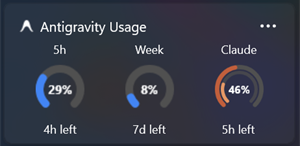
Skip typing /usage on Windows 11
Wburn pins live Antigravity 5-hour, weekly, and Claude/GPT gauges to your Widgets Board (Win+W). Reads your existing agy sign-in — zero config, free.
The quota pools Antigravity meters
Unlike Claude Code or Codex, Antigravity lets you switch between Gemini and third-party models in the same CLI — and meters them in separate quota groups:
Gemini Models (5-hour + weekly)
Paid Google AI plans meter Gemini on a rolling 5-hour window alongside a weekly pool. Free accounts drop the 5-hour pool and track the weekly quota directly.
Shared Claude & GPT models (5-hour + weekly)
Third-party models share their own 5-hour and weekly pools, independent of Gemini. Heavy Claude sessions can exhaust the third-party window while your Gemini pool is still wide open.
Google AI Credits
On Google AI Pro and Ultra plans with AI Credits enabled, overages draw from your credit balance. Run /credits inside agy to inspect or manage them.
Two ways to check your Antigravity usage
1. /usage (or /quota) and /credits in agy
Inside an interactive agy session, run /usage (or its alias /quota) for the official breakdown of every pool and reset timer, and /credits for your AI Credits panel. Accurate and built in — but only visible while a session is open.
2. A live Windows 11 widget (passive)
Wburn puts your Antigravity pools on the Windows 11 Widgets Board (Win + W), refreshing every 5 minutes. You get dedicated blue gauges for Gemini 5-hour and weekly limits alongside a concentric dual-ring gauge for shared Claude & GPT limits (5-hour outer arc, weekly inner arc, center percentage showing whichever is tighter). When Google AI Credits are active, your credit balance appears right under the third gauge.
Set up the Antigravity widget (zero config)
- 1.Make sure you've signed into Google Antigravity CLI (agy) on Windows at least once (this creates the gemini:antigravity entry in Windows Credential Manager).
- 2.Install Wburn from the Microsoft Store (free).
- 3.Press Win + W, click +, and pin Antigravity Usage. Wburn reads your existing credential read-only in memory and starts displaying live gauges immediately.
Frequently asked questions
How do I check my usage limits in Google Antigravity CLI (agy)?
Inside an active agy session, type /usage (or its alias /quota) to see your remaining Gemini 5-hour and weekly pools, your shared Claude and GPT pool, and reset timers. Run /credits to inspect Google AI Credits on Pro or Ultra plans. For passive monitoring outside the terminal, Wburn puts the same gauges on the Windows 11 Widgets Board.
Why are Gemini and Claude/GPT limits tracked separately in Antigravity?
Antigravity meters Google's Gemini models in one quota group (5-hour rolling and weekly pools) and third-party Claude and GPT models in a separate shared group with its own 5-hour and weekly windows. Burning through your Claude/GPT pool does not exhaust your Gemini pool, and vice versa.
Is Antigravity quota the same as Google Gemini CLI quota?
No. Google Gemini CLI uses per-model daily request quotas tied to ~/.gemini/oauth_creds.json, while Google Antigravity CLI (agy) uses Google AI plan 5-hour and weekly pools plus AI Credits stored in Windows Credential Manager (gemini:antigravity). Wburn has separate widgets for both.
Does Wburn need my Google password or API key for Antigravity?
No. Wburn reads the existing gemini:antigravity OAuth entry that agy already stores in Windows Credential Manager, uses it read-only in memory at refresh time, and never copies, stores, or refreshes your credentials.
What does the two-ring gauge on Wburn's Antigravity widget mean?
The third column combines both shared Claude and GPT windows into one concentric gauge: the outer terracotta arc shows the 5-hour pool, the inner amber arc shows the weekly pool, and the center percentage shows whichever limit is tighter — with that window's reset countdown (or active Google AI Credits) underneath.
Related: How to check Claude Code usage limits · How to check Codex CLI usage limits · ccusage vs Wburn · All Wburn widgets
Track Antigravity limits without opening a session
Live Gemini 5-hour, weekly, and dual-ring Claude/GPT gauges in your Windows Widgets. Free, zero config.
