Comparison · Updated July 2026
ccusage Alternative for Windows: Track Your Limits Without the Terminal
Short answer: if you love ccusage for cost reports, keep it — it's excellent at that. But if what you actually want is to see your remaining Claude Code, Codex, or Gemini CLI limits at a glance, a passive widget beats a CLI you have to remember to run. That's Wburn: free, native, zero-config gauges in the Windows Widgets Board.
What ccusage does well
ccusage (run via npx ccusage@latest) reads the JSONL logs Claude Code writes locally and turns them into token and cost reports — per day, per project, per session. If your question is "what did this week of agentic coding actually cost in API terms?", it's the right tool and we recommend it.
But as a limit monitor, a terminal report has structural downsides: the numbers are estimates reconstructed from logs (not the provider's official limit meter), you get them only when you remember to run it, and it's centered on Claude Code — while most of us now juggle two or three coding agents with separate quotas.
ccusage vs Wburn at a glance
| ccusage | Wburn | |
|---|---|---|
| Interface | Terminal reports | Live widgets (Win+W) |
| Data source | Local logs → cost estimates | Your CLI login → provider-reported limits |
| Best at | Retrospective cost analysis | "How close am I to the limit right now?" |
| Agents covered | Claude Code | Claude Code, OpenAI Codex, Gemini CLI |
| Effort | Run a command each time | Passive — refreshes every 5 minutes |
| Price | Free (open source) | Free (Microsoft Store) |
Honest take: they answer different questions. Plenty of developers run both — ccusage for the monthly cost picture, Wburn for not getting cut off at 4pm.
What the widget shows
One gauge card per agent, tracking the limits that actually stop your work:
Claude Code
5-hour window, weekly, model-specific weekly, extra usage spend.
OpenAI Codex
5-hour primary window and weekly secondary window.
Gemini CLI
Per-model quotas: Pro, Flash, and Flash Lite.
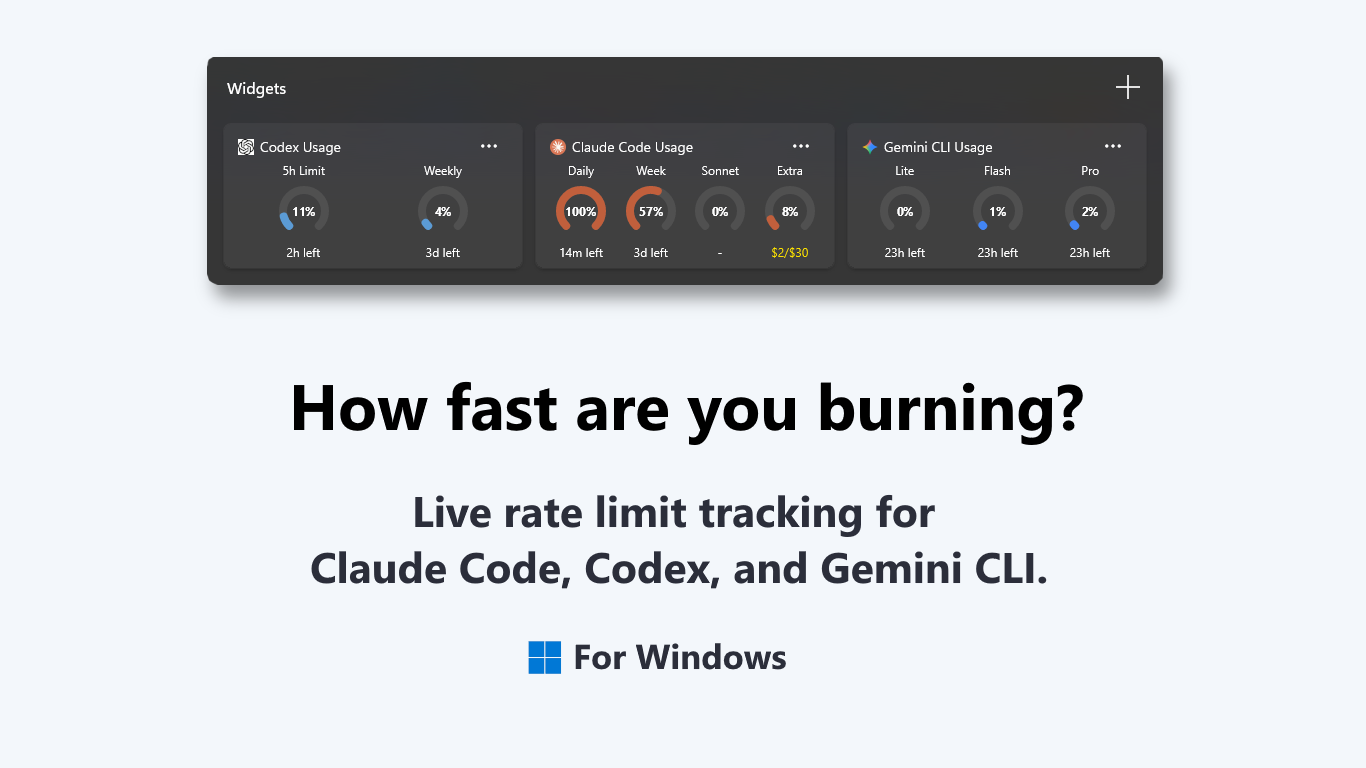
Setup is genuinely zero-config: Wburn reads the tokens your CLI logins already keep on your machine — in-memory only, no credential storage, no telemetry. If a token expires or a CLI isn't installed, the widget says so plainly instead of showing stale numbers.
Frequently asked questions
Is there a GUI alternative to ccusage on Windows?
Yes — Wburn, a free Store app that puts live limit gauges for Claude Code, Codex, and Gemini CLI in the Widgets Board.
Does Wburn replace ccusage completely?
Only if your goal is limit monitoring. For per-project token cost breakdowns, ccusage remains the better tool — they complement each other.
What does Wburn require?
Windows 11 (for the Widgets Board) and at least one supported CLI — Claude Code, OpenAI Codex, or Gemini CLI — logged in on your machine.
Is my login token safe?
Wburn reads tokens in-memory only to query your usage, stores nothing, and sends nothing anywhere except the provider's own usage endpoint.
Usage gauges without the terminal
Claude Code, Codex, and Gemini CLI — one Win+W away. Free.
