Guide · Updated July 2026
How to Check Your Claude Code Usage Limits
Short answer: type /usage inside Claude Code to see your session and weekly limits right now. If you'd rather not interrupt your session every time — or you want to see the burn before you start one — pin Wburn's live gauges to your Windows Widgets Board.
The limits you're actually burning
Claude subscription plans meter Claude Code on several overlapping windows, and hitting any of them stops your work:
Rolling 5-hour session window
The one that bites mid-task. It rolls continuously, so a heavy morning quietly eats your afternoon.
Weekly limits
An overall weekly cap plus a separate model-specific weekly limit. These reset on a fixed schedule, not on a rolling window.
Extra usage spend
If you've enabled pay-as-you-go extra usage, that's a budget worth watching too — it's real money once the included limits run out.
Three ways to check your usage
1. The /usage command (official, in-session)
Inside any Claude Code session, type /usage. You get the official numbers: session window consumption, weekly limits, and reset times. It's accurate and free — but it lives inside a session, so you check it reactively, usually after the "approaching limit" warning already appeared.
2. Terminal tools (for cost analysis)
Open-source CLIs like ccusage read Claude Code's local logs and estimate token spend per day, project, or session. Great for retrospective cost reports — but they're estimates you have to remember to run. (Full comparison: ccusage alternative for Windows.)
3. A widget that's always there (passive)
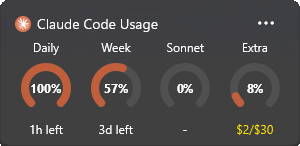
Wburn puts live gauges in the Windows Widgets Board: press Win + W and the burn rate is just there — before you start a session, during one, or after. It tracks the 5-hour window, the weekly limit, the model-specific weekly limit, and extra usage spend, refreshing every 5 minutes.
Set up the widget (zero config)
- 1.Install Wburn from the Microsoft Store (free).
- 2.Press Win + W, click +, and pin the Claude Code widget.
- 3.That's it. If you've ever logged into Claude Code on this machine, Wburn reads your existing CLI token (in-memory only — nothing is stored or sent anywhere) and starts showing your real limits immediately.
Frequently asked questions
What happens when I hit a limit?
Claude Code stops accepting requests until the window resets. The 5-hour window rolls continuously; weekly limits reset on the schedule shown in /usage. The point of monitoring is pacing heavy sessions so you never get cut off mid-refactor.
Does Wburn need my password or API key?
No. It reads the OAuth token your Claude Code login already keeps on this machine, in-memory only. No telemetry, no credential storage.
Does it track Codex and Gemini CLI too?
Yes — Wburn has separate widgets for OpenAI Codex rate limits and Gemini CLI per-model quotas, using the same zero-config approach.
What if my token expires or a CLI isn't installed?
The widget tells you exactly which CLI is missing or which token has expired instead of showing stale or empty gauges. It also caches last-known data offline.
Related: ccusage vs Wburn — which usage tracker do you need? · How to check Codex usage limits · All Wburn features
Stop getting surprised by rate limits
Live Claude Code usage gauges in your Windows Widgets. Free, zero config.
