Guide · Updated October 2026
Compress multiple videos at once
Select 5 or 50 videos, configure once, press Compress. FileSqueeze works through the whole batch on your PC and shows the result for every file.

$9.99 one-time · 7-day free trial
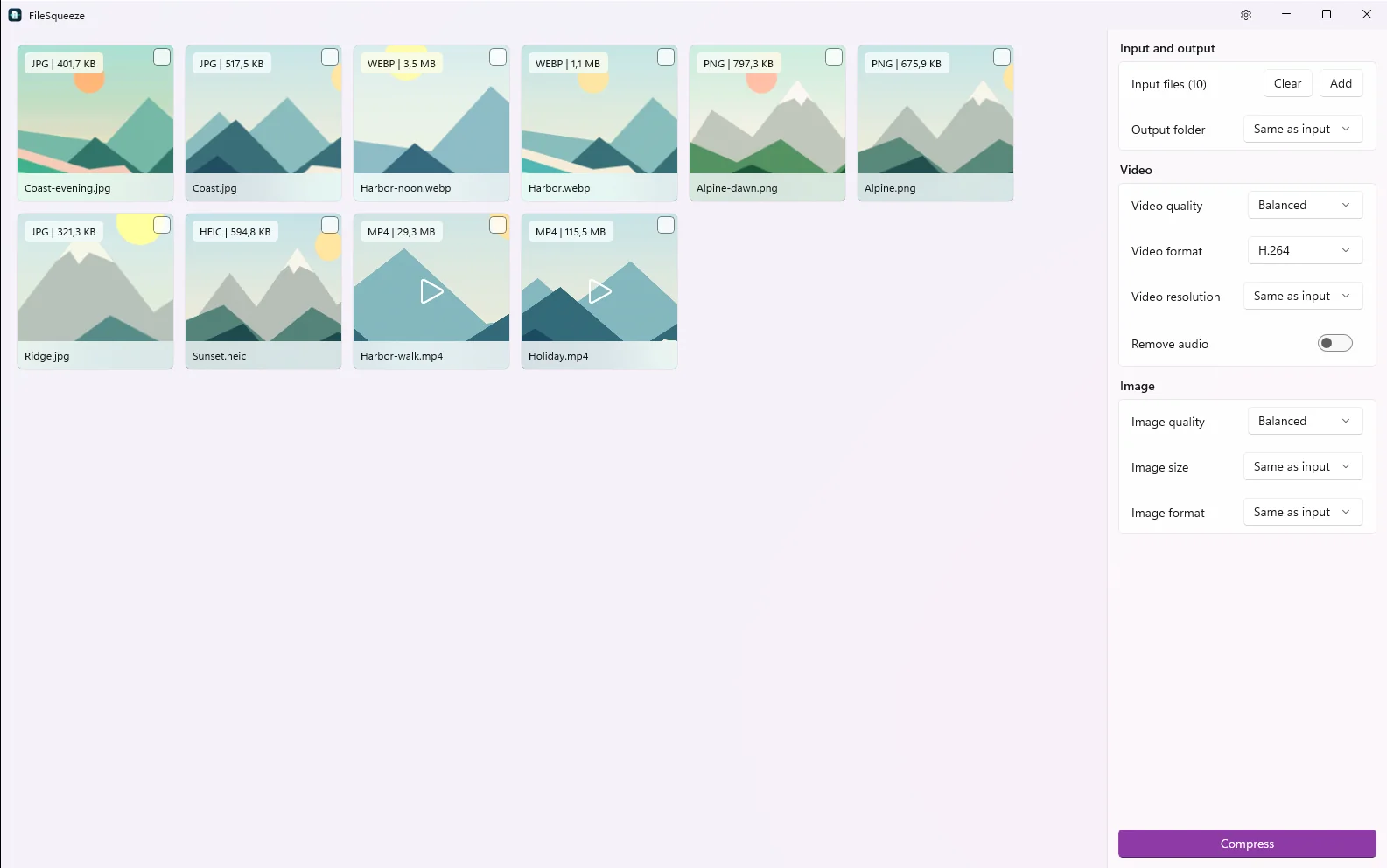
Configure once, compress the batch
- 1Add the videos. Select them in File Explorer and drag them onto the window, or use Add and multi-select in the file picker. Add more from another folder at any time; they join the same queue.
- 2Choose one setting for all of them: quality, resolution, H.264 or AV1, keep or remove audio, output folder.
- 3Press Compress. Go do something else.
Only some of them? Select cards.
Tick the cards you want and press Compress. Only that selection runs. With no selection, the whole queue runs. Clear empties the queue to start over.
A result for every file
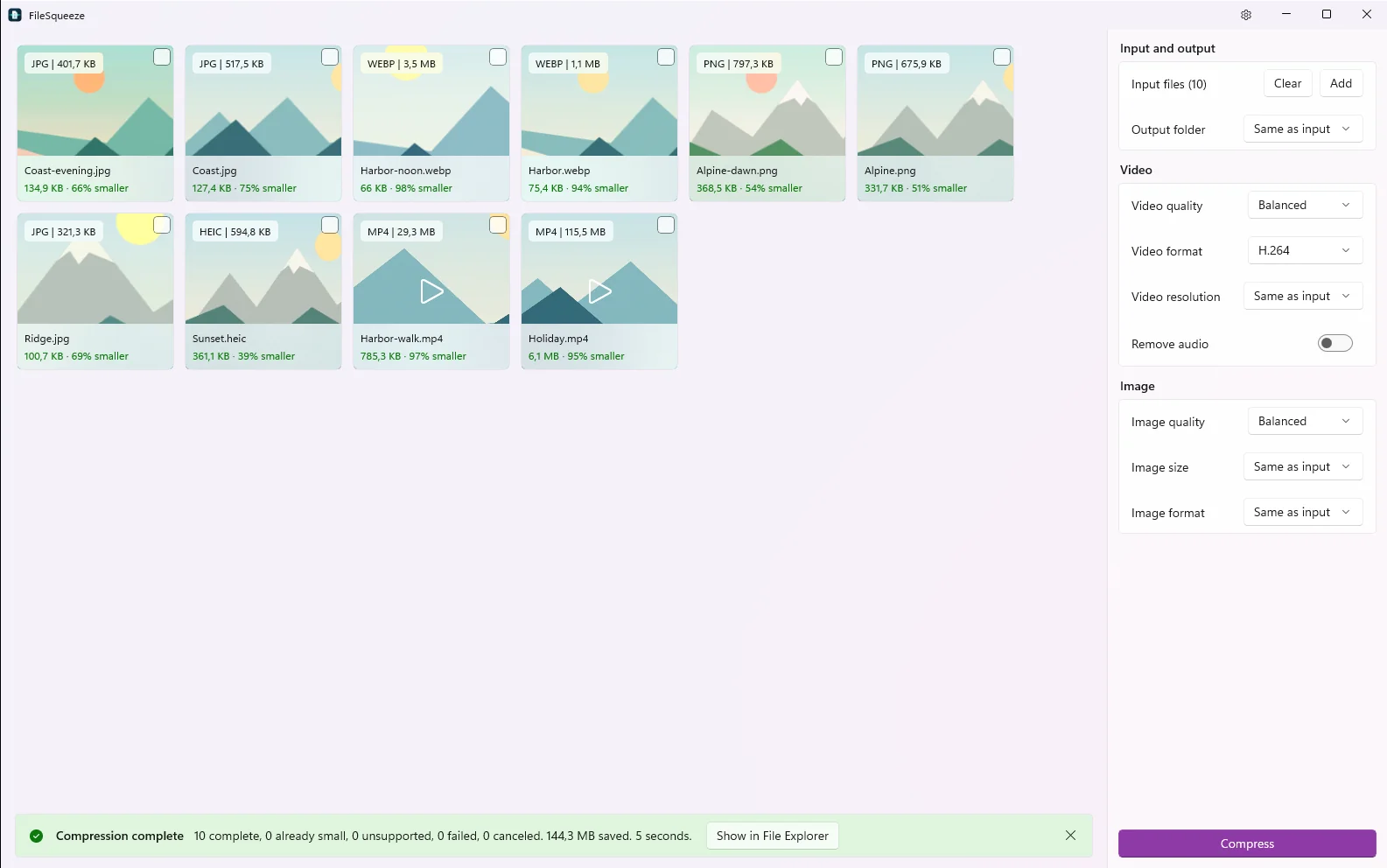
Each card shows what happened:
- New size and % smaller, for example "6.1 MB · 95% smaller".
- Already small: the result would not be smaller, so the original is kept and no extra copy is written.
- Unsupported or Cannot read, with the reason.
At the end, a summary line: complete, already small, unsupported, failed, canceled, total space saved and time taken. Show in File Explorer opens the results.
Why a desktop batch compressor
- No upload queue. Nothing is sent anywhere, so 50 files don't wait for 50 uploads.
- Your graphics card encodes. NVIDIA NVENC, Intel Quick Sync or AMD AMF, with Windows Media Foundation as a fallback. Two videos run in parallel on PCs with 8+ logical cores.
- Stop any time. Finished files stay. The unfinished file is cleaned up, never left half-written under its final name.
- Mixed batches work. Photos (JPEG, PNG, WebP, HEIC) can be in the same queue, with their own quality setting.
- No duplicates. Results get a
-squeezedname. If that name exists, the next one is-squeezed-2. Nothing is overwritten.
Real batch, real numbers
Ten photos and videos, Balanced quality, H.264, integrated AMD Radeon 780M: 144.3 MB saved in 5 seconds, 10 of 10 complete.
Savings depend on the source. Already compressed files may not get smaller.
Supported files
| Input | Output | |
|---|---|---|
| Video | MP4, MOV, MKV, WebM, AVI, M4V, WMV, MPG, MPEG | H.264 MP4 or AV1 MP4 |
| Photos | JPEG, PNG, WebP, HEIC, HEIF | Same format, or JPEG, PNG, WebP |
Requires Windows 11 24H2 or later on an x64 PC.
Got a whole directory instead?
Drag the folder itself. FileSqueeze takes every video in all subfolders and keeps the structure. See compress a whole folder of videos.
Configure once, compress the batch
Dozens of videos, one setting, a result for every file.
$9.99 one-time · 7-day free trial