From Screenshot to Notes in 17 Seconds
A folder of screenshots you can't search is a folder you'll never open again. Drag-and-drop one in and get back clean, paste-ready notes — key points, action items, and hashtags — privately and offline, on your own machine.
One-time purchase for $6.99 · Windows 10/11
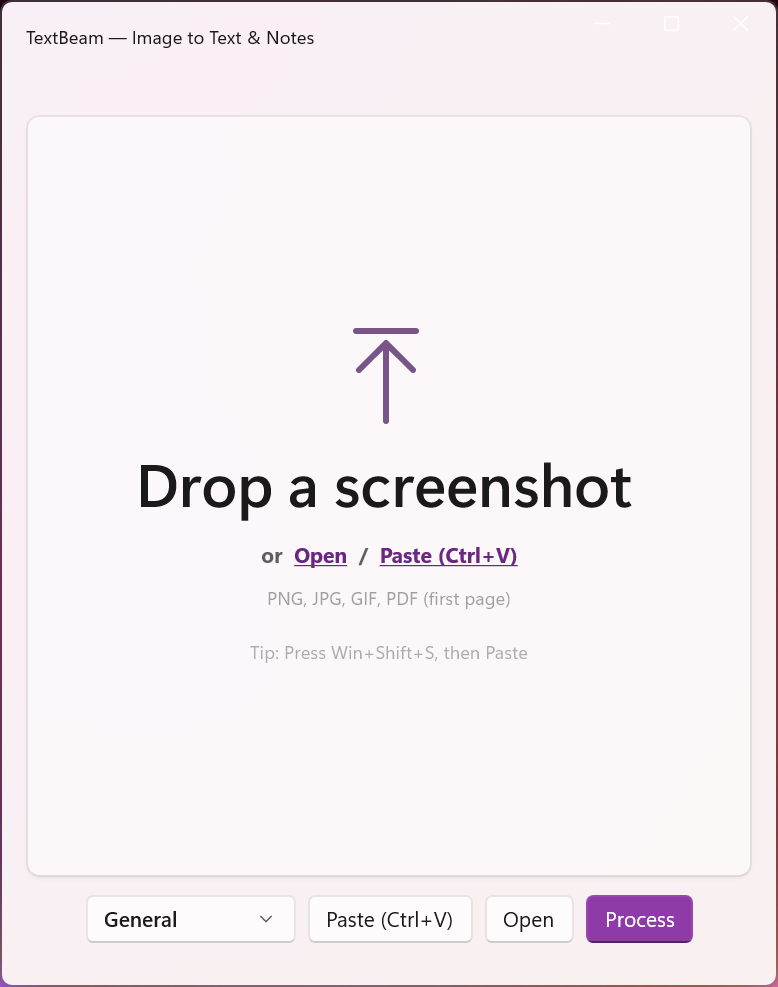
Most screenshot tools just extract text. TextBeam goes deeper: OCR + vision model on device to understand context, generate organized bullet points, action items, and hashtags. No double-dipping. No browser tabs. No leaks.
Features
17-Second Processing
From screenshot to structured notes in under 17 seconds. No more manual transcription or cleanup.
100% Offline
Your sensitive data never leaves your PC. Complete privacy guaranteed.
Smart Formatting
Organized bullets, action items, and hashtags. No raw text dumps.
7 Specialized Presets
Different workflows need different note styles. Choose the right format every time.
Simple Workflow
Drag, drop, copy — done. No training or complex interfaces needed.
How It Works
Drag & Drop
Drop any screenshot into TextBeam window.
Pick Preset
Choose from 7 note styles. (Bug report, meeting, research, etc.)
Copy Results
Get organized notes with bullets, actions, hashtags.
100% offline processing. No account, no cloud uploads.
7 Presets
General
Balanced
Balanced summary for filing/knowledge. Captures the few most important facts and relationships; trims noise. Adds concrete next steps only when they're explicit; includes topical hashtags.
Bug Report / QA
Debug
Engineer-focused defect triage. Highlights symptom, scope/impact, environment (OS/app/version), error codes, and any obvious trigger.
Action Items: reproduce, capture logs, narrow scope, assign owner, mitigation if hinted. Includes #bug, component, and severity tags.
Meeting / Planning
Business
For teammates who didn't attend. Lists decisions, open questions, constraints, and blocked items. Action Items are "who does what by when" only when present in the source. Omits chit-chat and duplicated bullets.
Research / Reading
Study
Brief for someone building understanding. Surfaces main claims/findings, key data, definitions, limitations, and cited entities.
Action Items: focus on verifying sources, comparing alternatives, experiments, or dataset extraction. Neutral tone.
Release / Changelog
Release
User-visible changes grouped by [Feat], [Fix], [Perf], [Break]. Includes docs, QA focus, rollout/flags, and comms as Action Items. Uses #version, components, and #breaking when needed.
Support Escalation
Support
Customer issue tracking and resolution. Captures account, timestamps/timezone, plan, symptom/scope, and steps tried.
Action Items: cover escalate path, SLAs, logs/IDs to collect, and comms updates. Includes customer/product/severity tags.
Text Extraction
Raw
Raw text only. Extracts all readable text with original line breaks/spacing. No summary, no analysis, no added bullets/headers. Ideal for copy-paste into your systems.
Built For
QA & Support
Capturing bugs fast
PMs & Engineers
Screenshots to tasks
Researchers
Briefs from images
Note Takers
UI snaps & charts
Guides
FAQ
How do I turn a screenshot into notes?
Drag it in, pick a preset, copy the result ~17 seconds later — key points, action items, and hashtags included.
Learn more →Do my screenshots get uploaded anywhere?
Never. OCR and the vision model run on your device via Ollama — after the one-time model download, it works fully offline.
Learn more →How is this different from Snipping Tool OCR?
Snipping Tool and PowerToys extract raw text. TextBeam understands context and gives you organized notes — the cleanup step is the product.
Is it a subscription?
No — one-time $6.99 on the Microsoft Store. No account, no recurring fees.
What does it require?
Windows 10/11 (x64) and Ollama, which the app helps you set up on first launch. Works on CPU; a GPU makes it faster.
When is raw text extraction enough?
When you just need the words — use the Text Extraction preset for clean raw text with original line breaks, still fully offline.
Requirements
- Runs fully on device. On first launch you'll be prompted to download a local AI engine and model (e.g., via Ollama). Processing stays on your PC.
- Works on CPU; a modern GPU is recommended for best performance. Without a GPU, large or complex images may process more slowly.
- Windows 10/11, x64.
Ready to stop transcribing screenshots?
One-time purchase for $6.99. No subscriptions.
I post what I'm building — new widgets, Windows dev notes, and the occasional thing that didn't work.
Follow on X